What to do if your phone is lost or stolen during the FIFA World Cup 2026™


Losing your phone or having it stolen at the FIFA World Cup 2026™ is stressful on several levels. It may hold your match ticket, payment apps, hotel bookings, travel details, and a small library of personal data. And in a crowded stadium concourse, fan zone, or transit ride back to your hotel, it may take a while to notice it’s missing.
The good news is that acting quickly can help limit the damage.
Lock and locate your phone remotely
Both Android and iOS devices have built-in tools for this. Lock your phone first, then check its location on the map.
Android
Google’s tracking service is now called Find Hub (previously Find My Device). It uses your Google account and the phone’s last known location to help locate, ring, lock, or erase the device.
- Go to Find Hub in a browser and sign in with the Google account linked to the missing phone.
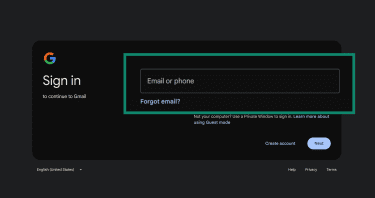
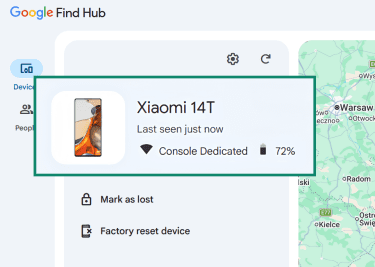
- Select your device from the list.
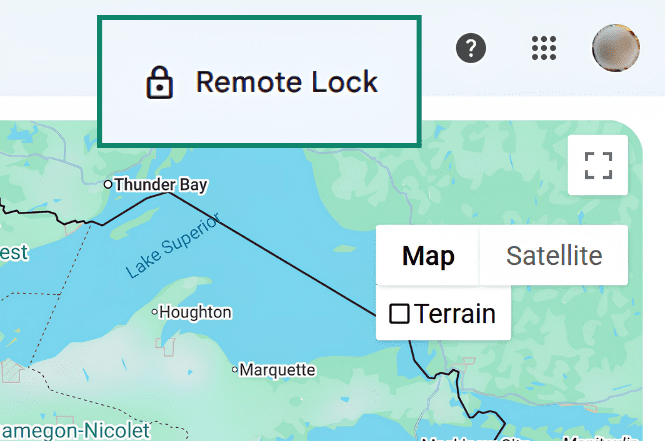
- In the top right corner, choose Remote Lock.
- Enter your phone number and click Lock device.
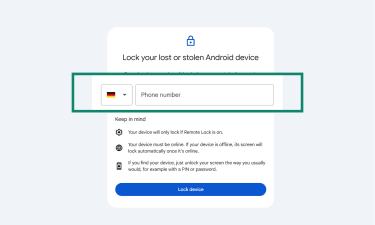
- Check its location on the map. If it appears nearby, use Play sound to make it ring, even if it’s set to silent.
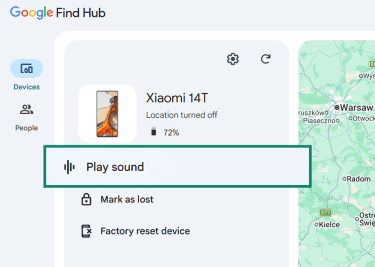
Worth knowing about Android’s other anti-theft layers:
- Theft Detection Lock (Android 15+): Automatically locks the device if it detects motion that may indicate theft, such as someone grabbing your device and running away quickly.
- Remote Lock by phone number: Lets you lock your phone from android.com/lock using your verified phone number, which can help if you can’t access your Google account.
iPhone
Apple’s Find My service is tied to your Apple ID.
- Go to Find Devices and sign in with the Apple Account used on your iPhone.
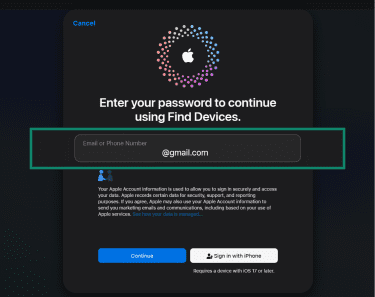
- Select the device from the list.
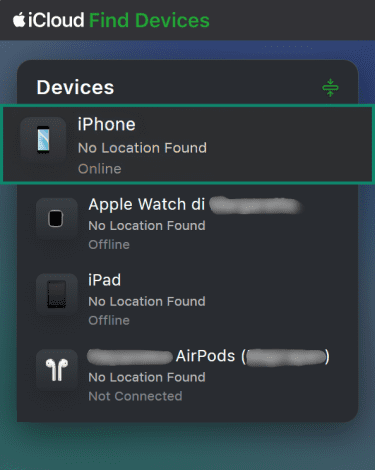
- Choose Lost iPhone.
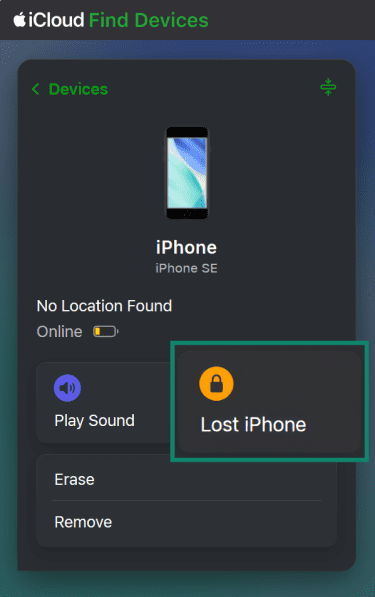
- Press Next.
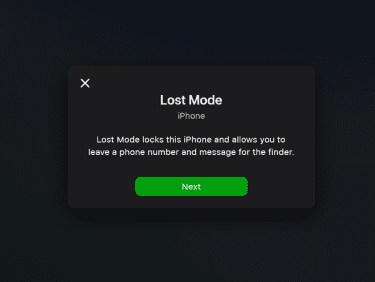
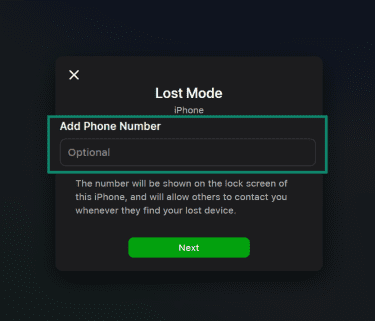
- Add a phone number that will display on the locked screen. Select Next.
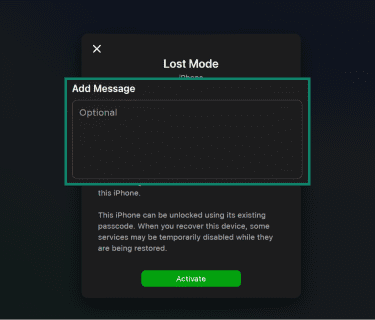
- You can also add a message, like “please return this,” to appear on the locked screen. Press Activate.
- View your phone’s location on the map. If it's nearby, use Play Sound.
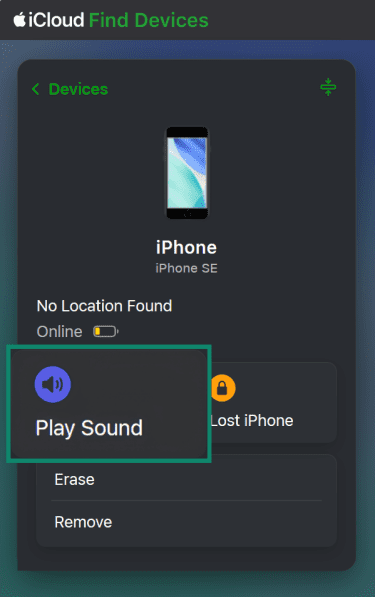
Two iPhone-specific things worth knowing:
- Stolen Device Protection (iOS 17.3+): Adds extra protection for sensitive actions, such as changing an Apple Account password or device passcode. It requires Face ID or Touch ID, and some changes may also require a security delay.
- Find My network: Helps locate a missing iPhone through nearby Apple devices, including when it’s offline. Some supported iPhone models may also be locatable for a period after being powered off.
What to do if you can’t find your phone
If the map shows nothing or the device is offline, stop relying on tracking alone and focus on protecting what’s on it. The phone may be gone, but your tickets, accounts, and money don’t have to be.
Notify your bank or payment providers
If your phone has Apple Pay, Google Wallet, or banking apps installed, access to those accounts matters more than the device itself. The fastest way to lock everything down:
- Suspend or remove mobile wallet cards: For Apple Pay, mark the device as lost in Find My or remove payment cards from Apple Pay when signing into your Apple Account at iCloud. For Google Wallet, remove payment methods through the Google Wallet website or secure the device through Find Hub.
- Contact your bank to flag the accounts: Call the number on your bank’s official website or use online banking from a trusted device.
- Freeze cards linked to the phone: Many banks let cardholders temporarily lock cards instead of fully canceling them.
- Review recent transactions: Immediately report anything you don’t recognize.
Don’t forget smaller items either, such as transit cards in your wallet app or payment methods saved inside individual apps like Uber.
Get your FIFA World Cup 2026™ ticket back
Your match ticket is tied to your ticketing account and can’t be stored as a screenshot or document.
To get back in:
- Borrow a phone from a friend or get a cheap prepaid one from a local shop.
- Sign in with the same ticketing account you used to buy the ticket and retrieve your tickets in the app.
Just note that ticket access may be limited if your ticket is still open on another device. If you see an “Unable to access” pop-up saying your tickets are currently open on another device, follow the app’s instructions to regain access.
Contact the venue’s lost and found
Stadiums often collect lost items during and after major events, so before assuming the worst, check with the venue’s lost-and-found or guest services team. Some venues use phone lines, while others require an online claim form. Call from a borrowed phone, submit a claim online, or follow up from your hotel.
| City | Stadium | Lost-and-found or guest services contact |
| Atlanta | Mercedes-Benz Stadium (Atlanta Stadium) | Complete the online form |
| Boston | Gillette Stadium (Boston Stadium) | (508) 543-8200 |
| Dallas (Arlington, TX) | AT&T Stadium (Dallas Stadium) | (817) 892-4161 |
| Guadalajara (Zapopan) | Estadio Akron (Estadio Guadalajara) | (33) 3777-5700 |
| Houston | NRG Stadium (Houston Stadium) | (832) 667-1400 |
| Kansas City | GEHA Field at Arrowhead Stadium (Kansas City Stadium) | Complete the online form |
| Los Angeles (Inglewood, CA) | SoFi Stadium (Los Angeles Stadium) | (424) 541-9100 |
| Miami (Miami Gardens, FL) | Hard Rock Stadium (Miami Stadium) | (305) 943-8000 |
| Mexico City | Estadio Banorte (Mexico City Stadium) | (55) 5487-3126 |
| Monterrey (Guadalupe) | Estadio BBVA (Estadio Monterrey) | (81) 8127-1505 |
| New York/New Jersey (East Rutherford, NJ) | MetLife Stadium (New York, New Jersey Stadium) | Complete the online form |
| Philadelphia | Lincoln Financial Field (Philadelphia Stadium) | (267) 570-4094 |
| San Francisco Bay Area (Santa Clara, CA) | Levi's Stadium (San Francisco Bay Area Stadium) | (408) 673-2180 |
| Seattle | Lumen Field (Seattle Stadium) | (206) 381-7544 |
| Toronto | BMO Field (Toronto Stadium) | (416) 815-5982 |
| Vancouver | BC Place (BC Place Vancouver) | (604) 661-7303 |
When submitting a report, give them:
- A clear description of the phone, including color, case, lock-screen photo, or anything else distinctive.
- The approximate time and location you last had it. Even partial details, such as your section number or the gate you came through, can help.
- A way to reach you. An email address you can check from anywhere is usually best.
If you’ve already left the venue, keep checking back over the next 24–48 hours. Items often get logged a day after they’re handed in, especially after a packed match day.
File a police report
If the phone was stolen, file a police report. If it was simply misplaced, check the venue’s lost and found first, but don’t wait too long if theft is likely. A police report creates the official paper trail your travel insurance may require, and it may help if the device is recovered later.
Before reporting, get the following information together:
- The phone’s make, model, and serial number.
- The International Mobile Equipment Identity (IMEI) number, if available. You may be able to find it in Find Hub, your Apple Account device list, the original box, or your purchase receipt.
- The last known location and time, plus any tracking screenshots.
A useful tip: dial *#06# on your phone now and write down the IMEI somewhere that isn’t your phone. It’s one of the most useful things you can do before a trip.
Then decide where to go. If a police station is nearby and you’ve got the time, filing in person is often the most straightforward option. Otherwise, use one of the routes below.
Country guidance
The right reporting route depends on where the phone was lost or stolen. If it happened inside or near a stadium, use the police department for the stadium’s actual city or municipality, not just the FIFA World Cup 2026™ host-city name. For non-emergencies, use online reporting where available, the local police non-emergency number, or the nearest police station.
| Country | Non-emergency protocol for fans |
| The U.S. | In many U.S. cities, 311 is a non-emergency city services line that may route requests, such as lost property reports. Availability varies by location. Where 311 isn’t available or doesn’t apply, use the police department’s online reporting portal or call the local non-emergency number. |
| Canada | File online or by phone. Contact the Toronto Police Service non-emergency at 416-808-2222 or the Vancouver Police Department at 604-717-3321. |
| Mexico | Call 911 for emergencies or crimes in progress. For theft, ask the venue, hotel, or local authorities where to file a report; this may involve the local Ministerio Público.
In Mexico City, LOCATEL can help international visitors with stolen belongings, cell phones, documents, or tickets. The 078 Green Angels line can help with tourist information and roadside assistance, but it is not a replacement for police reporting. |
U.S. host city non-emergency numbers
If you’re using an international SIM, short codes like 311 may not connect. Use the 10-digit number instead. Most departments also have an online reporting portal for stolen property, which is often faster than the phone.
| City | Stadium location | Non-emergency number |
| Atlanta | Atlanta | (404) 658-6666 |
| Boston | Foxborough, MA | (508) 543-4343 |
| Dallas | Arlington, TX | (817) 274-4444 |
| Houston | Houston | (713) 884-3131 |
| Kansas City | Kansas City, MO | (816) 234-5111 |
| Los Angeles | Inglewood, CA | (310) 412-8771 |
| Miami | Miami Gardens, FL | (305) 474-6473 |
| New York/New Jersey | East Rutherford, NJ | (201) 438-0165 |
| Philadelphia | Philadelphia | (215) 686-8686 |
| San Francisco Bay Area | Santa Clara, CA | (408) 615-5580 |
| Seattle | Seattle | (206) 625-5011 |
International visitors and consular help
Losing a phone is not, on its own, an embassy-level problem. But if the theft was violent, or if your passport or visa documents were stolen with it, your embassy or consulate is a useful next port of call. They can talk you through local police procedures, help replace travel documents, and put you in touch with someone who speaks your language.
Find your nearest embassy or consulate through official directories such as:
- U.S. State Department: U.S. embassies and consulates.
- Global Affairs Canada: Canadian offices abroad.
- Mexico (SRE): Mexico embassies and consulates directory.
Travel prep worth doing now: photograph your passport and other identity documents, and store copies somewhere secure that you can access without your phone. Don’t rely only on photos saved locally on the device.
Contact your mobile carrier
Tell your mobile carrier the phone is missing as soon as you can. Ask them to suspend the SIM or mobile service so calls, texts, and data can’t be used or charged to your account. This also helps reduce the risk of someone using your number to receive verification codes. While you’re speaking with them, ask:
- To suspend or disable the SIM or service without canceling your number.
- About a temporary replacement SIM or eSIM if you’ll need one for the rest of the trip.
- Whether your account includes device insurance or replacement coverage.
- Whether they can blocklist the phone’s IMEI so it can’t connect to supported networks, even with a different SIM.
If you’re on a travel eSIM, log into the provider’s app or web portal from another device, or contact its support team by the method it provides. Pause, disable, or replace the eSIM if those options are available. Don’t assume a remote lock or wipe automatically cancels the mobile plan; check the provider’s portal or support guidance to make sure the eSIM or plan can’t continue to be used.
Remotely erase the phone
If you’ve locked the phone and the map shows no recent location, wiping the device may be the safest next step. It permanently deletes everything stored locally (your photos, messages, notes, downloaded files, and saved account data), but there’s no undo button.
- If your FIFA World Cup 2026™ tickets haven’t successfully transferred to another device, contact customer support before you wipe.
- Make sure anything important is backed up to the cloud. Many photos and notes sync automatically, but check before you assume.
- If you haven’t already locked the phone, do that first.
After erasing, you may no longer be able to track the device (especially on Android). Keep the device linked to your account so protections like Activation Lock remain in place.
Android: Remote factory reset
You can erase an Android phone through your Google account using Find Hub.
- Go to Find Hub and sign in with the Google account linked to the phone.
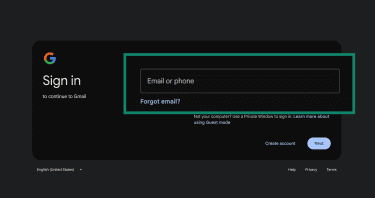
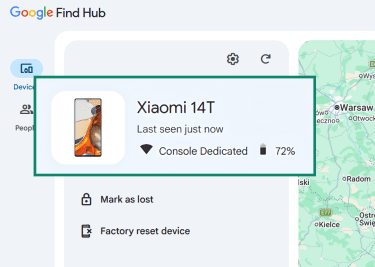
- Select the missing device from the list.
- Select Factory reset device to permanently delete all data from the phone.
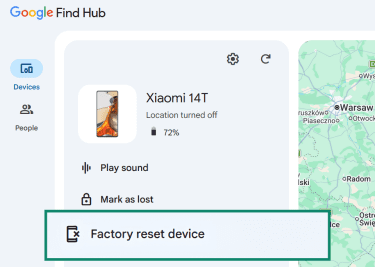
- Click Next.
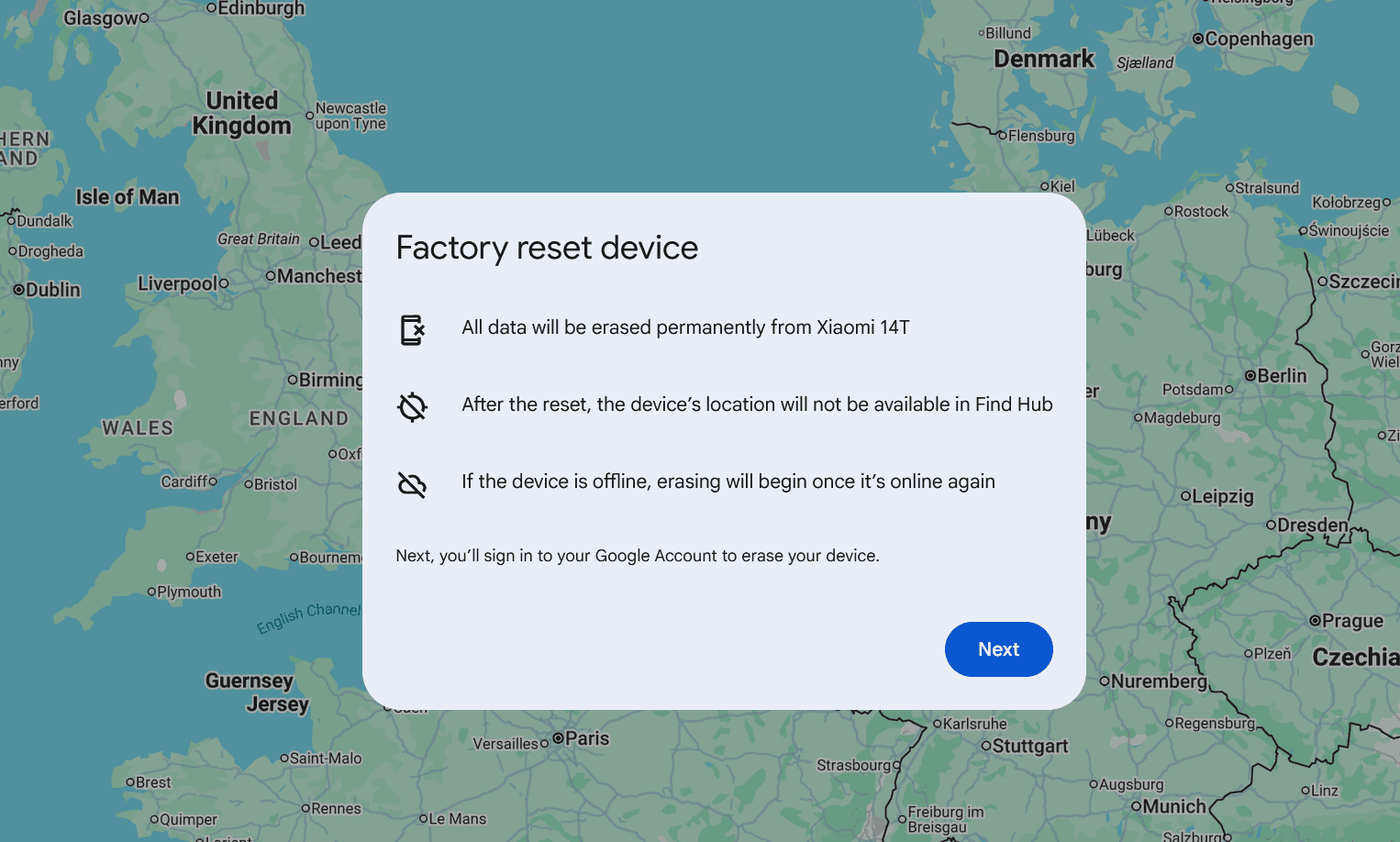
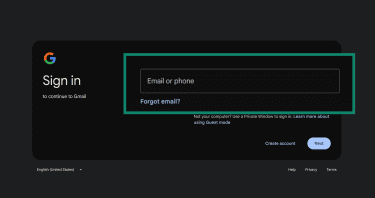
- Enter your Google account credentials to confirm and click Next.
iOS: Remote erase
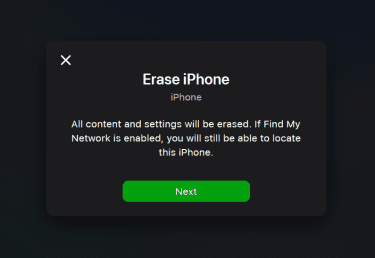
Use Apple’s Find My to remotely erase your phone. Note that remote erase can’t be undone. If the device is offline, the erase begins the next time it comes online.
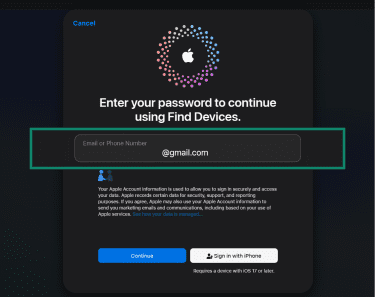
- Go to Find Devices and sign in with the Apple Account linked to the missing device.
- Select the device from the list.
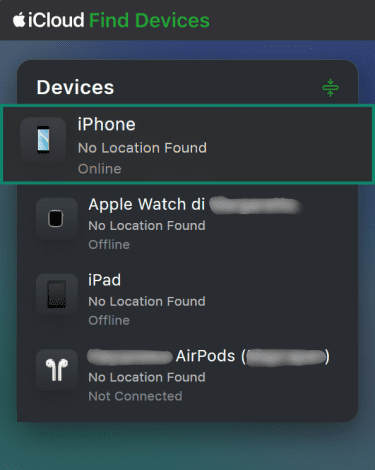
- Choose Erase or Erase This Device to remotely remove all data.
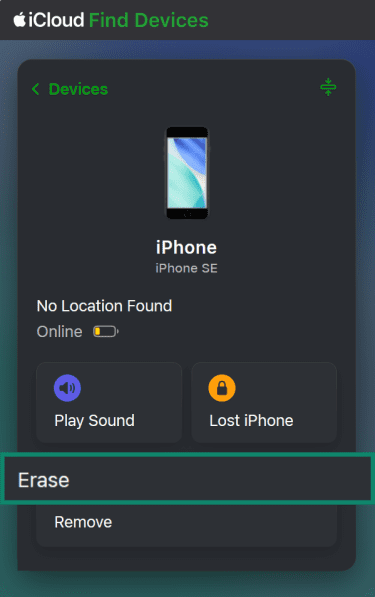
- Click Next.
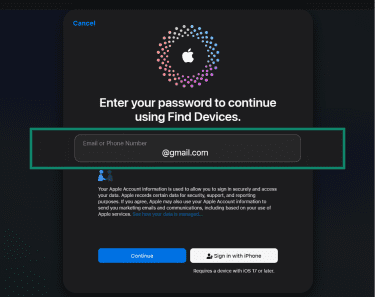
- Enter your Apple Account password to confirm and click Continue.
Lock down all your accounts
When a phone is lost or stolen during a major event like the FIFA World Cup 2026™, the biggest risk isn’t the device itself but the access it provides. Securing your accounts is where you prevent real damage.
Sign out of everywhere and change passwords
Start with the accounts that unlock everything else:
- Email: It’s the master key. Most other passwords are reset through it. Change the password and sign out of all active sessions. Most providers list “logged in devices” in the security settings.
- FIFA World Cup 2026™ ticketing account: Change the password and check ticket access from a new device so the lost phone can't be used to access or manage your tickets.
- Banking and finance apps: Change passwords, PINs, or app passcodes where needed.
- Social media: Prioritize accounts tied to two-factor authentication (2FA) codes or recovery options.
Use strong, unique passwords for each account. A password manager can help with this.
Watch for unusual activity
Act quickly in the first few hours, but keep monitoring for weeks afterward. Stolen credentials can be used later or sold to other scammers. Watch for:
- Unfamiliar email or banking logins.
- Transactions you don't recognize.
- Password reset emails you didn't request.
- New devices being added to accounts.
Report anything unusual to the relevant service provider as soon as possible.
FAQ
Is it better to report your phone lost or stolen?
Can I still track my phone if it’s turned off?
Should I erase my phone immediately?
Will insurance cover a stolen phone abroad?