 Celebrate with up to 80% off
Tracking pixel: How it works and how to protect your privacy



Tracking pixels are small, hidden tools that help companies measure what people do online. They can log signals such as email opens, page visits, ad clicks, and conversions, often without any obvious sign that they're there.
Learning about pixel tracking (how it works and what data it collects) may help you better control your online privacy and keep sensitive data away from prying eyes.
What is a tracking pixel?
A tracking pixel is a hidden tracking element that triggers a request to a remote server when a page or email loads. The name comes from the older 1×1 transparent image approach, which is still common in email, though many websites now use JavaScript-based tags for similar measurement purposes.
By itself, a tracking pixel usually records that an event happened. More detailed profiling typically occurs later, when event data is linked to other identifiers, such as cookies or device fingerprints.
The purpose of tracking pixels
Tracking pixels are used to measure activity and campaign performance. On websites, they can help record events such as page views, sign-ups, purchases, and ad clicks. In email, they are often used to estimate opens and engagement.
That makes them useful for analytics, ad attribution, campaign reporting, and digital marketing. The privacy concerns begin when those small tracking events become part of a larger system that links activity across sites, devices, or accounts.
How does a tracking pixel work?
A tracking pixel works by triggering an HTTP or HTTPS request to a remote server when a page, ad, or email loads. That request creates a server record indicating that the content was accessed, and it may include technical details about the request itself. The exact details available depend on the browser, email client, and privacy protections in place.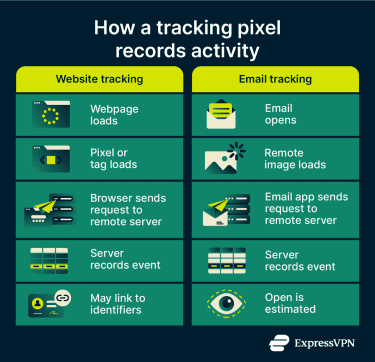
Inserting a tracking pixel
In practice, a tracking pixel is usually added in one of two ways. The first is a transparent 1×1-pixel image that links to a file on a remote server. The second is a JavaScript tag or script element that loads tracking code from an outside source.
Unlike a simple image request, JavaScript-based tracking can trigger multiple HTTP(S) requests and send event data and parameters as the user interacts with the page. In both cases, the browser fetches something from another server, and that fetch is what creates the tracking event.
On a webpage, that remote request happens when the page loads and the browser processes the image or script. With JavaScript-based tags, additional requests may be sent later when the user clicks, signs up, adds an item to a cart, or completes a purchase. In an email, it happens when the message loads remote content, which is why email tracking has traditionally relied on remote images. However, some email apps now preload that content or mask request details, so a pixel load does not always reflect a normal, user-initiated open.
What information can pixels collect?
A tracking pixel usually doesn't collect a full personal profile on its own. It typically captures metadata tied to the request. That can include the IP address used for the connection, the request time, the user-agent string, and the referrer URL.
The user-agent string is browser- or app-supplied information that can indicate the browser, app, operating system, or version. The referrer URL can sometimes show which page triggered the request, though browsers may limit that information or send none at all, depending on referrer policies and browser defaults.
That distinction matters. The pixel is often just the trigger. The richer profile, if one is built, usually comes later on the server side when the request data is linked to other identifiers, such as cookies already stored in the browser or similar data tied to the same device or browser session. Cookies are designed to be sent back on later requests, though modern browser protections can limit when cross-site cookies are available.
In other words, the pixel tells the server that something happened. The broader tracking picture is derived by combining that event with other data sources. That's a more accurate way to think about modern web tracking than to imagine the pixel itself as an all-seeing sensor.
Tracking pixel vs. cookies
A tracking pixel and a cookie do different jobs. A pixel triggers a request when content loads. A cookie stores a small amount of data in the browser, and that data can be sent back to the same server on later requests to help the browser be recognized over time.
For example, if you click an ad for a pair of running shoes and visit the retailer's website, a cookie may be stored in your browser to help the site or ad platform recognize that browser later. On product pages and other parts of a site, events are often tracked directly with JavaScript rather than a literal tracking pixel image. Because the site already controls the page, it can send event data to a server without relying on a separate image request.
If that person comes back later and buys the shoes, a tag or other tracking request on the order confirmation page can be used to report the purchase. If the relevant cookie or other identifier is still available in that browser context, the platform can link the earlier visit to the later sale within the same browser history.
That's why tracking pixels and cookies often work together. The pixel reports an event, such as a page view, sign-up, or purchase. A cookie or similar identifier can help link that event to earlier activity in the same browser, though modern browser protections may limit such cross-site recognition. Used together, they support analytics, conversion tracking, and retargeting.
Types of tracking pixels
Tracking pixels are often grouped by where they appear and what they're meant to measure. The main differences are the context in which they're used and the activity they're designed to track.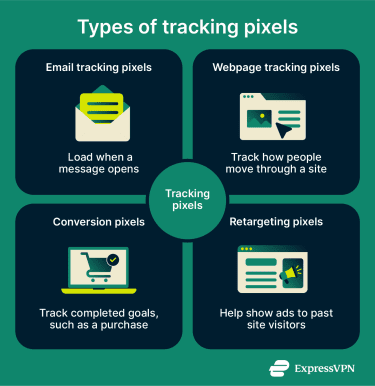
Email tracking pixels
Email tracking pixels are hidden elements placed inside HTML emails. In many cases, they appear as a tiny remote image that loads when the message displays remote content. That can help estimate whether the email was opened and when the load happened.
This kind of tracking has limits. Some email apps block remote content, and Apple's Mail Privacy Protection can privately download remote content in the background and hide the recipient's IP address. That can make email-open data less reliable than it once was.
Webpage tracking pixels
On websites and landing pages, tracking is often used to understand how people move through a site. It can show whether someone only viewed a page, started a sign-up flow, added an item to a cart, or completed a purchase. In many modern setups, this is handled through event tags and scripts rather than a traditional image-based pixel.
These tracking methods become more useful when event data can be linked to cookies or other identifiers associated with the same browser or session, though modern browser protections can limit such recognition across sites.
Conversion pixels
Conversion pixels are used to measure whether someone completed a specific action after visiting a site or clicking an ad. That action might be a purchase, a form submission, a subscription, an app install, or another business goal. In practice, the same tag or tracking setup can often record different conversion events by sending different event names, parameters, or values, sometimes through a tag manager or data layer.
A simple example is an online store that places a conversion tracking on its order confirmation page. When the page loads after checkout, the tracking setup records a sale.
Retargeting pixels
Retargeting pixels help advertising platforms recognize that a browser visited a site or viewed a product. It typically does this by relying on identifiers such as cookies, login state, or similar signals, so ads can later be shown to that same browser or audience segment. How well that works depends on what identifiers are available, as modern browsers often restrict cross-site tracking by blocking or partitioning third-party cookies and related storage.
The goal here is different from conversion tracking. Conversion pixels measure whether an action was completed. Retargeting pixels help build audiences for later advertising. In real systems, the two often rely on the same underlying tag infrastructure.
For example, if you browse a product page and leave without buying, a retargeting setup can help place that browser into an audience segment for later ads. The point isn't to measure the sale itself, but to identify earlier interest and use that information for future ad targeting.
Pros and cons of using tracking pixels
At a glance, tracking pixels give businesses useful measurement tools, but they can also feed into larger tracking systems that many users never see. Here's a high-level view of the main pros and cons of tracking pixels. We break each one down in more detail below.
| Quick view | Why businesses use tracking pixels | Why users may object |
| Performance tracking | Measures visits, clicks, conversions, and, in email, estimated opens | Usually works in the background and is hard to spot |
| Attribution | Helps show which ad, email, or page led to an action | Can be combined with cookies or other identifiers to link activity over time |
| Retargeting | Helps advertisers reach people who visited but didn't convert | Can support ad profiling and user behavior analytics |
| Analytics | Gives teams data on engagement and campaign results | Often sends event data from the browser or app to third-party vendors or platforms |
| Easy deployment | Often added through a tag, script, or tag manager setup | Adds to a broader tracking stack that users may not control |
Advantages for marketers
For marketers, the main benefit is measurement. A tracking pixel can help show whether someone viewed a product page, subscribed to a newsletter, added an item to a cart, or completed a purchase. That makes it easier to connect ad spend or email campaigns to real outcomes, rather than guessing which channel worked.
Tracking tools also support audience building and follow-up advertising. When a site uses a tag or pixel tied to an ad platform, that platform can use the recorded events to create audience segments, such as people who visited a product page but didn't check out. That's one reason pixels sit at the center of both conversion tracking and retargeting.
In email, pixels have often been used to estimate opens and compare campaign performance. That can help senders test subject lines, timing, and basic engagement. But email tracking has become less precise, especially in clients that load remote content in the background or mask IP addresses.
User privacy concerns
The main concern for users isn't the pixel in isolation, but the system around it. A single-pixel request may only log basic request data, but that event can be linked to cookies, ad IDs, and other identifiers. The privacy and data-handling risks increase when tracking is tied to third-party scripts, analytics tags, tag managers, or other external services rather than a simple image request.
Unlike an image-based pixel, a third-party script executes code in the browser in the context of the page. That means it can trigger additional requests, access page content, and send more detailed event information to outside platforms. In that way, a small hidden element can become part of a much broader picture of someone's browsing activity.
The privacy concern is not just that a pixel records an event, but that the event can become part of a wider tracking system. When linked with identifiers or third-party tools, those small signals can help build a broader picture of browsing or email activity that users may not realize is being collected.
Data security problems
Tracking pixels aren't automatically a security threat. A simple image-based pixel is usually just a remote request. The risk increases when tracking relies on outside code and services, such as ad scripts, analytics tags, tag managers, and other third-party tools that receive event data. That data may include page views, clicks, purchases, IP addresses, browser details, and other identifiers tied to user activity. Each added third-party component creates another point where data can be exposed, mishandled, or collected more broadly than expected.
There's also a practical data-handling problem. If a site sends event data to multiple vendors or passes more information than it needs, it creates more opportunities for user data to be exposed, retained, or combined in ways users didn't expect. So the real downside isn't just that pixels exist. It's that they often plug into a broader third-party tracking stack, which can be hard to audit and harder for users to see.
Legal considerations
Privacy laws usually regulate how a business can use tracking pixels, what data it processes, what notices users receive, what choices users have, and what happens to that data afterward. So the legal question is usually not "is this pixel legal?" It's "was this tracking deployed and disclosed in a lawful way?"
Are tracking pixels GDPR compliant?
Tracking pixels are not automatically General Data Protection Regulation (GDPR) compliant; compliance depends on the context. The GDPR is technology-neutral, which means it applies to the processing of personal data regardless of the specific tool used. It also recognizes that online identifiers, including IP addresses and cookie identifiers, can leave traces that may be linked to a person. That matters for tracking pixels, since pixel requests often involve exactly those kinds of identifiers.
So a tracking pixel isn't automatically GDPR compliant just because it's small or invisible. If it processes personal data, the controller still needs a lawful basis. In limited cases, a business may rely on legitimate interests, but only if it can show that the processing is necessary, that a legitimate interest is at stake, and that the individual's rights and freedoms don't override it. GDPR also requires transparent information about how personal data is processed. If the business relies on consent, it must be able to show that consent was given and that it's as easy to withdraw as to give.
There's one more wrinkle in the European Union. In many website tracking cases, GDPR is only part of the picture. The European Data Protection Board has said that tracking techniques can also fall under Article 5(3) of the ePrivacy Directive, which covers not only storing information on a user's device but also accessing information already stored there. That means the rule can apply even when a tool reads browser- or device-side information without writing anything new to the device.
In practice, businesses that use tracking pixels on websites often need to consider both GDPR and ePrivacy rules, especially for non-essential tracking used for analytics or advertising.
What do the CCPA and CPRA require?
The California Consumer Privacy Act (CCPA) and the California Privacy Rights Act (CPRA) don't ban tracking pixels as a category. Instead, they focus on notice, disclosure, and consumer rights and limit how personal information is sold or shared. The statute defines cross-context behavioral advertising as advertising based on a consumer's activity across businesses, distinctly branded websites, applications, or services other than the one the consumer intentionally interacts with. That definition is important because some pixel-based ad tracking can fall into that bucket.
For businesses covered by the law, that usually means a few practical duties. They need to provide privacy disclosures, including information in the privacy policy about categories of personal information and certain disclosures over the previous 12 months. They also need to provide notice at the time of collection. California's regulations also address cases where a business allows a third-party ad network to collect personal information through the business's website.
The opt-out right is a big part of the California framework. Under the CPRA, "sharing" specifically includes disclosing personal information for cross-context behavioral advertising, even if no money changes hands. Businesses generally must honor qualifying opt-out preference signals, such as Global Privacy Control. The CPPA explains that these signals may be sent through a browser setting or browser extension.
FTC guidance and enforcement
In the United States, the Federal Trade Commission (FTC) doesn't treat tracking pixels as automatically illegal. Its focus is on unfair or deceptive practices. That usually means the agency generally looks at whether a company's data collection, sharing, and privacy practices align with what it told users, and whether sensitive information was disclosed in ways that contradict those promises or would mislead consumers.
That's why FTC enforcement often turns on facts such as broken privacy promises, hidden sharing with ad platforms, or the use of tracking tools in sensitive settings, such as health services. For example, in the GoodRx case, the FTC alleged that the company shared sensitive health information with advertising companies and platforms in violation of its privacy promises. The FTC has taken similar action in other health-related cases involving online tracking technologies and advertising disclosures.
So, if a business uses tracking pixels, it should know what data the pixel sends, who receives it, what legal basis or user choice supports that transfer, and whether the privacy notice matches the real data flow. That's the part regulators tend to care about.
How to block pixel tracking
You usually can't disable every tracking pixel with a single setting. The most practical approach is layered: block some tracking requests from loading, limit third-party tracking in your browser, and reduce the amount of identifying data exposed when a request still goes through.
Adjust browser settings and email clients
Safari
In Safari on Mac, you can turn on Prevent cross-site tracking using these steps:
- Safari > Settings (or Preferences in older macOS versions) > Privacy.

- Check the box for Prevent cross-site tracking.
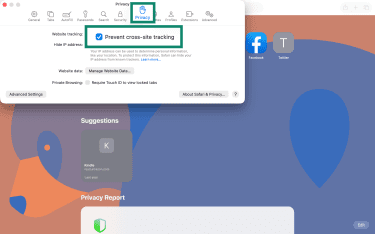
Additional protection: In the same Privacy tab, you can enable Hide IP address from trackers to help limit tracker access to your IP address. For maximum privacy, you can go to the Advanced tab and set Use advanced tracking and fingerprinting protection to In all browsing for broader protection, though some website features may be affected.
iOS
- Navigate to Settings > Apps.
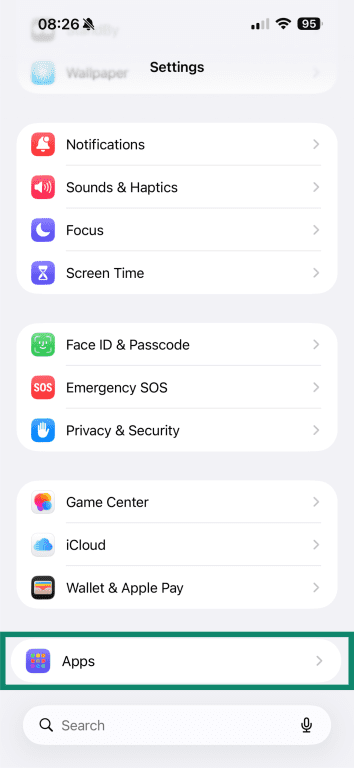
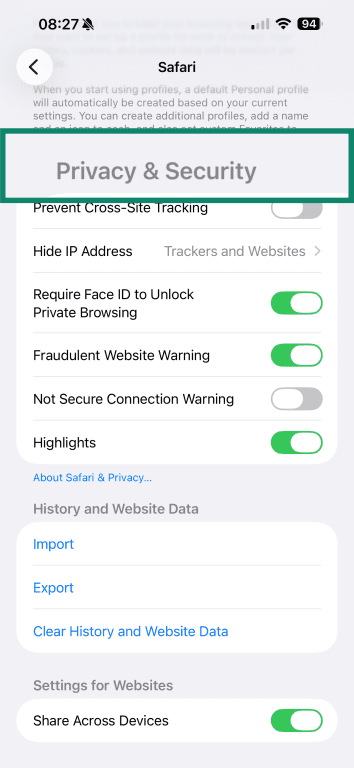
- Safari > Scroll down to Privacy & Security.
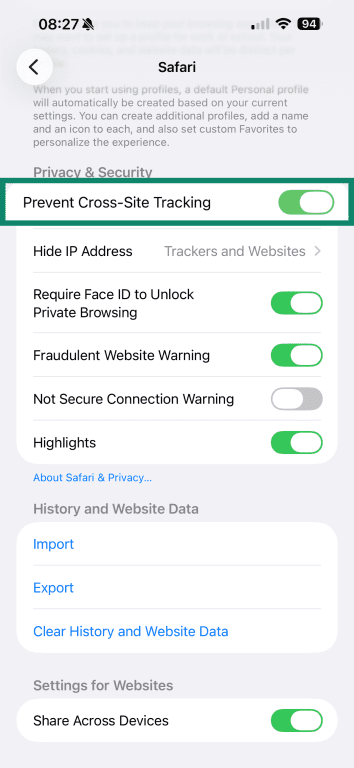
- Toggle on Prevent Cross-Site Tracking.
Firefox
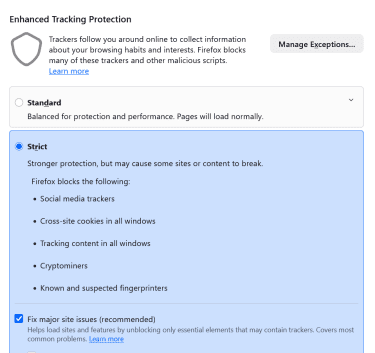
In Firefox, Enhanced Tracking Protection is built in and blocks many known trackers by default:
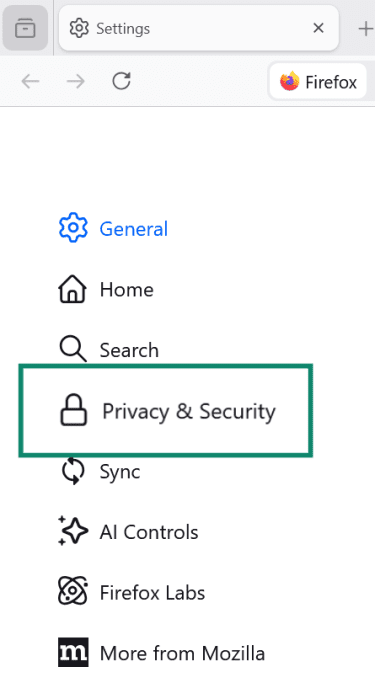
- Firefox Menu > Settings (or Preferences) > Privacy & Security.
- Under Enhanced Tracking Protection, choose Standard or Strict (or in some cases, Custom). Standard is the default setting.
Gmail
In Gmail, images are typically fetched through Google's systems rather than directly from your device. This helps limit what senders can learn about you, such as information about your computer or location, and can reduce the reliability of tracking pixels.
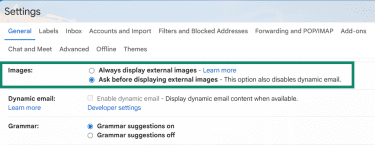
Changing image settings to Ask before displaying external images may give you more control, but it can also make tracking more explicit in some cases, since images are loaded only when you choose to display them.
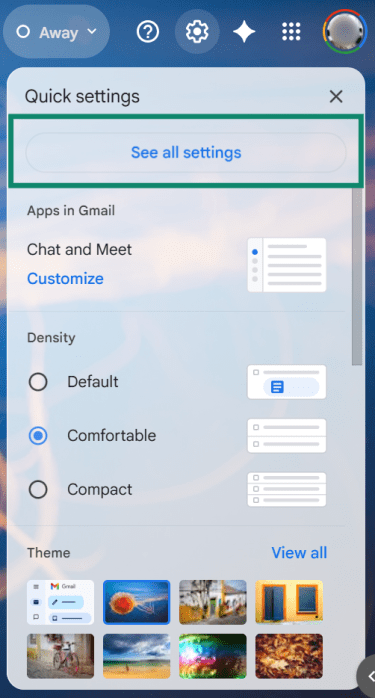
- Go to Settings > See all settings.
- Under Images, select Ask before displaying external images, then Save Changes.
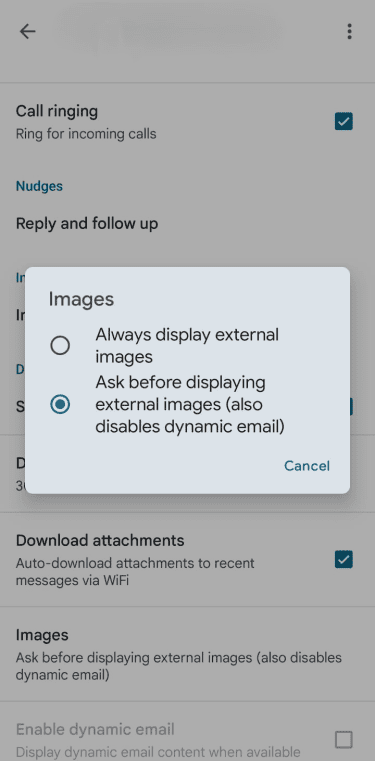
On Android, Gmail also lets you choose Ask before showing external images under the account's image settings:
- Tap the Menu (three horizontal lines) > Settings.
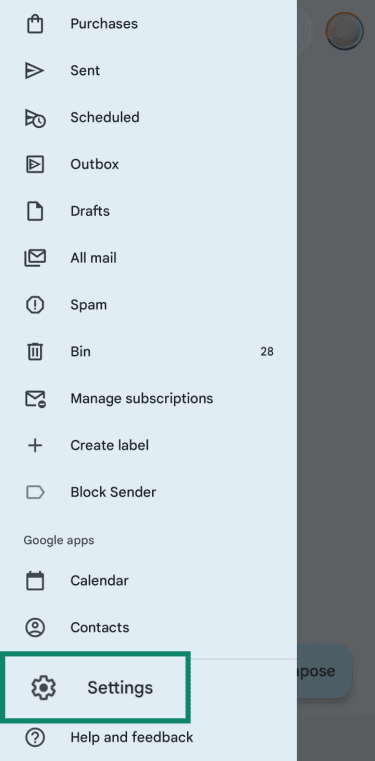
- Select the specific email account you wish to change.

- Under Data usage, tap Images > Ask before displaying external images.
Also read: How to block someone on Gmail and prevent unwanted emails.
Outlook
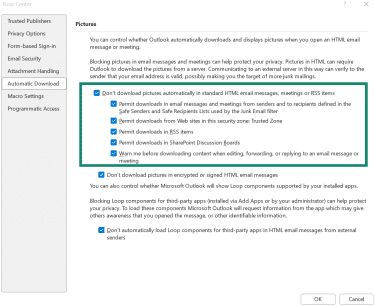
In classic Outlook for Windows, Microsoft provides controls to block automatic picture downloads. In newer Outlook products, the available protection depends on the app. Outlook.com and new Outlook for Windows use external image protection settings, while Outlook for Android and iOS offer a Block External Images setting.
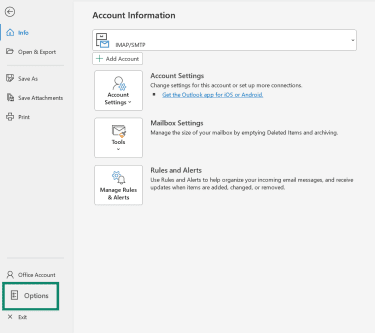
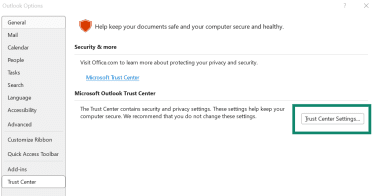
Classic Outlook for Windows (desktop):
- Go to File > Options.
- Trust Center > Trust Center Settings.
- Go to Automatic Download. Check the box for Don't download pictures automatically in standard HTML email messages, meetings or RSS items.
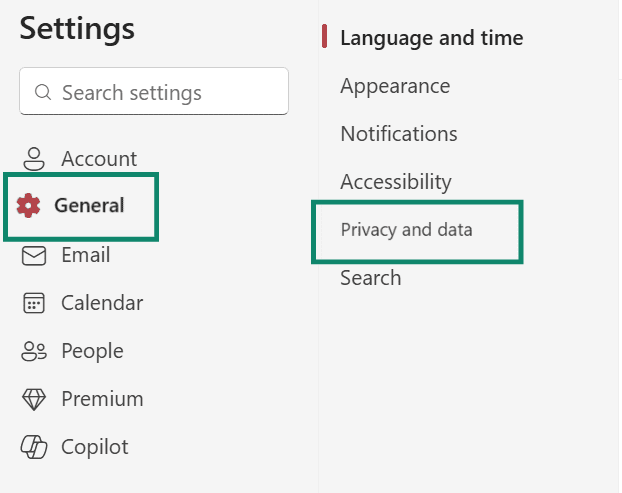
New Outlook for Windows (Outlook.com):
- Settings > General > Privacy and data.
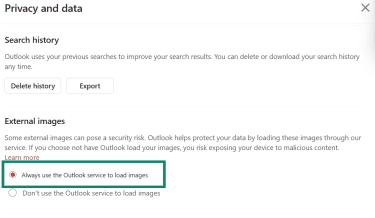
- Under External images, choose Always use the Outlook service to load images.
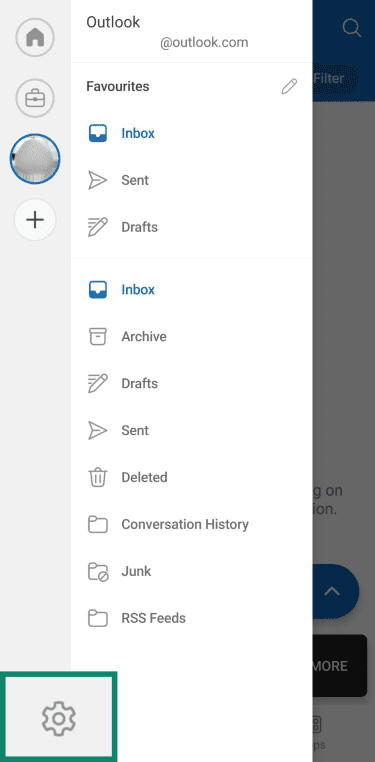
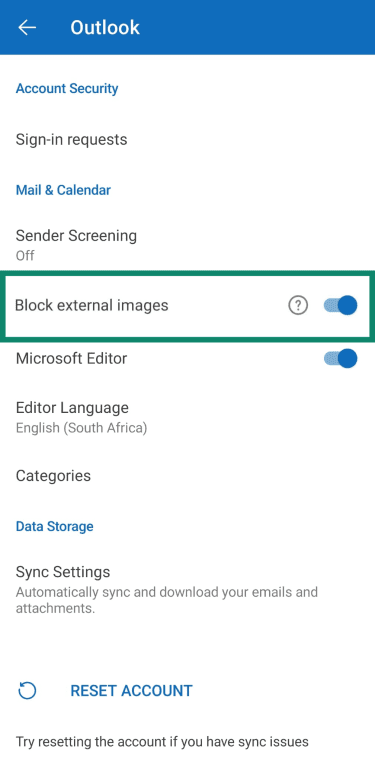
Outlook mobile app (Android and iPhone):
- Tap your profile icon > Settings (gear icon).
- Under Accounts, select your account.

- Toggle on Block external images.
Privacy tools that reduce pixel tracking
No single tool stops every kind of pixel tracking. Some tools block tracking requests before they load. Others make those requests less useful by limiting the identifying data they expose. The most effective approach is to combine tools and strategies.
Browser extensions
Tracker-blocking browser extensions can stop many known tracking requests from loading in the first place. That can include advertising tags, analytics scripts, and other third-party elements tied to cross-site tracking. These tools can be useful, but they work best when paired with built-in browser privacy settings. They also vary in quality, so it's worth choosing established extensions with a clear privacy policy and a narrow purpose.
Email masking
Email masking services solve a different problem. They don't block a tracking pixel inside a message once remote content loads, but they can help keep your real email address out of more databases and mailing lists. Services such as Firefox Relay, Apple's Hide My Email, and ExpressVPN's ExpressMailGuard create masked addresses that forward messages to your real inbox. That makes it easier to block a sender, retire an address, or limit how widely an email identity is reused across sites.
Virtual private network (VPN)
A VPN can hide your IP address from websites and tracking endpoints by routing traffic through a VPN server, reducing one useful identifier. But trackers may still rely on other signals, such as cookies, login state, or browser fingerprinting, to recognize a browser or link activity over time.
What a VPN doesn't do on its own is stop a browser from loading a pixel, prevent cookies from being stored, or block browser-based profiling. For that, you still need browser protections, email settings, and tracker-blocking tools working alongside it. For example, ExpressVPN's Threat Manager is designed to block connections to known tracking domains at the device level, which can help stop some tracker requests before they reach third parties.
Responsible use for businesses
Businesses that use tracking pixels should be clear about what they collect, why they collect it, and who receives the data. For non-essential advertising or profiling, that often means giving users a real choice through consent or opt-out controls, depending on the law.
They should also limit what they send through pixels and how long they keep it. In practice, that means collecting only the data needed for a defined purpose, avoiding sensitive information unless there's a clear need and lawful basis to process it, and regularly reviewing vendor and retention settings.
FAQ
Is pixel tracking illegal?
What is a tracking pixel in email?
What is a Facebook tracking pixel?