Kronos Private Cloud (KPC) ransomware attack: What happened and what can be learned


When a payroll platform goes offline, the disruption can extend far beyond a single company. That’s what happened during the Kronos Private Cloud (KPC) ransomware attack, disclosed in December 2021, which affected organizations relying on the service operated by Ultimate Kronos Group (UKG).
The outage lasted several weeks while systems were investigated and restored, requiring some organizations to rely on temporary or manual processes for payroll and scheduling.
This article explains what happened, how it affected organizations, what the event shows about operational dependencies on cloud platforms, and what organizations can do to reduce risk in the future.
Note: This article focuses on the ransomware incident that affected Ultimate Kronos Group’s cloud platform, not the Kronos banking trojan.
What is KPC?
KPC is a managed cloud environment operated by UKG that hosts workforce management systems used by organizations across industries such as healthcare, retail, and public services. These systems support functions like payroll processing, employee scheduling, and timekeeping.
These applications handle workforce operations and process employment-related data such as work schedules, time records, and other personnel information for organizations that use the service.
What happened in the Kronos Private Cloud (KPC) ransomware attack?
In December 2021, UKG reported suspicious activity in the KPC environment. On December 11, the company confirmed the activity was linked to a ransomware incident and shut down affected services.
The shutdown disrupted access to KPC tools, leading some employers to switch to contingency processes such as manual time tracking and temporary payroll calculations. UKG notified customers that the outage could last several weeks while the incident was investigated and systems were restored.
During the recovery period, UKG worked with external cybersecurity experts and provided regular updates to customers. Service restoration began in phases in early January 2022 as systems were rebuilt and verified. By late January, many customers had regained access to KPC services, though some follow-up fixes continued afterward.
After the incident, UKG stated that it implemented additional monitoring and security measures as part of its recovery and remediation efforts.
What was the impact of the KPC ransomware incident?
The outage reportedly affected millions of employees whose organizations relied on the KPC platform for payroll, scheduling, and timekeeping. When access to these systems was disrupted, organizations had to revert to manual processes, such as paper timecards for payroll and scheduling.
The disruption created administrative challenges across sectors, such as healthcare, retail, and public services. Some organizations reported delayed paychecks or temporary payroll process adjustments while systems were offline.
How does ransomware work?
Ransomware infiltrates a computer system, encrypting the victim's files and rendering them inaccessible until a ransom is paid for the decryption key. Some ransomware campaigns also steal data and threaten to publish it unless payment is made.
The attack on the KPC platform is one example of how ransomware can disrupt critical systems. While the exact entry point was not publicly disclosed, ransomware campaigns commonly reach organizations through several types of entry points.
7 common ransomware entry points
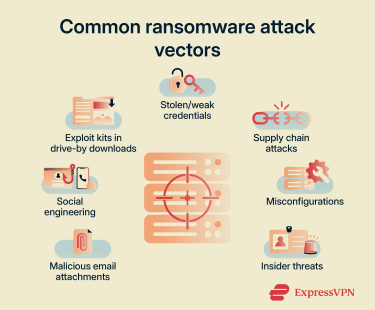
Stolen or weak credentials
Attackers may gain access by logging in with valid credentials, which can make the activity appear legitimate. They acquire credentials through previous data breaches or purchase them. They may then use credential stuffing or brute-force attacks.
Weak passwords and a lack of multi-factor authentication (MFA) could allow attackers to access a Remote Desktop Protocol (RDP), giving them further access to internal systems.
Malicious email attachments
Attackers may embed malicious links in PDFs or macros in Word documents or Excel spreadsheets. These often arrive in the target user’s inbox disguised as urgent invoices or legal notices. If the victim clicks the link or executes the macro, it can trigger ransomware payload delivery.
Social engineering
Social engineering relies on deception and persuasion to bypass technical defenses. Attackers send fraudulent communications that mimic trusted entities, prompting the user to click links, disclose passwords, or enter data.
Exploit kits in drive-by downloads
Exploit kits are automated codebases hosted on compromised websites or malicious ads. When a user visits the site, the kit scans their browser and operating system for unpatched software vulnerabilities. If it finds a gap in the defense, it injects malicious code that can lead to ransomware being installed. This drive-by infection typically happens silently while viewing the page, requiring no clicks or downloads on the user’s part.
Supply chain attacks
Rather than attacking a well-defended organization directly, threat actors may compromise software providers within an organization’s supply chain. They inject malicious code containing ransomware into legitimate software updates or tools, which the target may unknowingly download and install.
Misconfigurations
Ransomware could also enter through unforced errors. Leaving ports open, failing to secure cloud storage buckets, or setting access controls too broadly can open gaps that attackers can identify and exploit.
Insider threats
In other cases, insiders may contribute to the attack. A disgruntled employee might misuse their privileges, or a negligent team member might bypass safety policies, creating the opening attackers need to install ransomware.
How to protect against a ransomware attack
Defense typically involves a layered approach. Technical safeguards, paired with organizational preparation, can help prevent attacks before they execute or recover quickly if they do.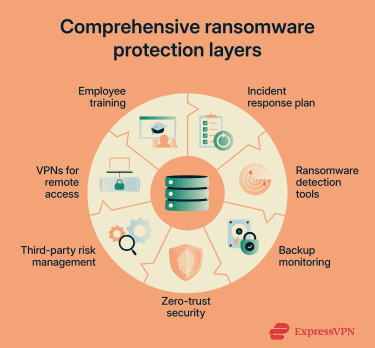
Train employees on cybersecurity awareness
Technology can’t stop every threat if team members invite them in. It’s important to train employees to recognize the signs of suspicious behavior, such as unexpected file extensions, mismatched URLs in emails, or urgent requests for credentials. Regular, simulated phishing tests help identify gaps in awareness and encourage staff to pause and verify before they click.
Create an incident response plan
In the event of an attack, there might not be enough time to debate the next move. A pre-approved plan can define roles, communication protocols, and decision-making authority. This roadmap lets organizations isolate infected systems immediately, notify relevant stakeholders, and begin recovery procedures quickly, minimizing the operational impact.
Use ransomware detection tools
Traditional antivirus software may miss modern ransomware. Advanced endpoint security solutions, such as endpoint detection and response (EDR) tools, are commonly used to monitor systems and networks for suspicious activity, such as mass file modifications or unauthorized encryption. These tools can contain a threat by disconnecting an infected device from the network before the damage spreads.
Monitor backups
Your backups are a safety net, but only if they work and stay out of the attacker’s reach. Maintaining offline or isolated backups can reduce the impact of a ransomware attack. Regularly test these backups to verify that data can be restored completely and quickly.
Implement zero-trust security measures
A zero-trust model is based on verifying every user and device, regardless of location. Enforcing least-privilege access, giving employees access only to the files they strictly need for their jobs, limits the data an attacker can reach if they compromise a single account.
Manage third-party risks
Third-party vendors can also introduce security risks. It’s important to assess the security posture of any third party with access to systems or data, and require them to adhere to your security standards. If a vendor suffers a breach, controls should be in place to limit the spread of a compromise.
Use virtual private networks (VPNs) for remote access
If employees work remotely, they may connect via an untrusted Wi-Fi network. This can introduce additional exposure risks, so organizations sometimes require a VPN for remote access. A VPN creates an encrypted tunnel for your data, helping protect data in transit.
How to respond and recover from a ransomware attack
Responding to a ransomware incident typically involves containing the disruption, coordinating across teams, and restoring systems in a controlled way. While the exact response varies by organization, a structured approach can help reduce operational impact and support recovery.
Organizations often focus first on limiting the spread of the attack and assessing which systems are affected. This is usually followed by coordination between internal teams and external partners, such as security specialists or service providers, to manage the incident and determine next steps.
Recovery efforts commonly depend on existing preparation, including access to reliable backups and predefined response plans. After systems are restored, organizations typically review the incident to understand contributing factors and identify areas for improvement. In some situations, organizations may consider payment as a last resort if critical operations are disrupted and no recovery options are available. This decision typically depends on factors such as operational impact, legal considerations, and available alternatives.
FAQ: Common questions about the KPC ransomware attack
Has Kronos been hacked?
Should I pay the ransom in a ransomware attack?
What are the best practices for ransomware protection?
How can organizations detect ransomware?
Take the first step to protect yourself online. Try ExpressVPN risk-free.
Get ExpressVPN