How a VPN can help protect your privacy from government surveillance


The full scope of government surveillance can be hard to assess. Practices vary by country, and many details aren’t made public. Governments may use surveillance in criminal investigations, national security operations, and intelligence gathering.
Using ExpressVPN can help reduce some forms of online surveillance by encrypting your internet traffic and hiding your real IP address. That said, it won’t prevent all forms of monitoring. A VPN alone can’t hide activity from services you're logged into, prevent companies from selling your data, or erase information you've already shared.

Note: The following article is not legal advice; it is intended only for general education purposes. Please check your local laws and regulations before taking any actions mentioned in this guide.
What ExpressVPN can help with
ExpressVPN can help limit some of the data that may be collected through mass online surveillance. This type of surveillance involves collecting or monitoring internet activity or online communications across large groups of people.
Governments might collect this information directly, or they might legally request it from tech corporations or websites. Some private companies also share or sell data about people’s online activity to data brokers, which may then sell it to government agencies. Depending on the jurisdiction and the type of data, agencies may be able to buy information they would otherwise need a warrant to obtain.
A VPN can help limit some of the information collected through mass online surveillance by making parts of your internet activity less visible (though it can’t help with everything).
Hides online activity from your ISP
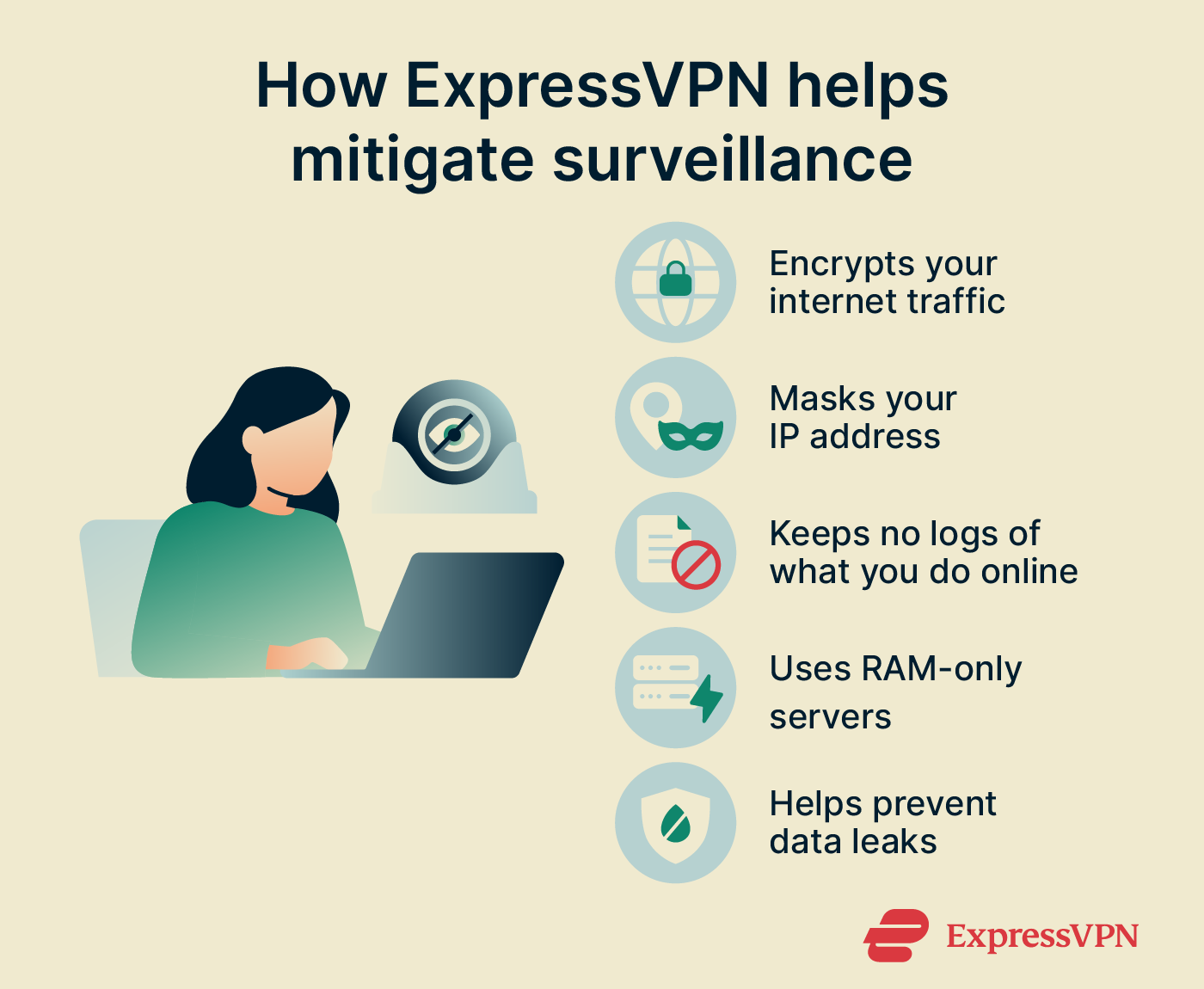
Mass online surveillance often includes requesting information from service providers, including internet service providers (ISPs). ExpressVPN encrypts your traffic and masks your IP address, so your ISP generally can't see which sites and services you connect to, and websites see a VPN server's IP instead of yours.
For a full explanation of how ExpressVPN helps hide your browsing activity from your ISP, see our guide.
Doesn’t log or store your browsing data
Government surveillance can include compelling a VPN provider to hand over any data it holds about a user. It’s why a no-logs policy is one of the first things you should look for in a VPN.
ExpressVPN’s no-logs policy means we don't collect browsing history, traffic destinations, Domain Name System (DNS) queries, or connection logs. That means we have no record of what you do online to hand over to anyone, even if it’s legally requested. Our transparency report shows the requests for user data our legal team receives, and in each case, we had no activity records to provide.
Our TrustedServer system also makes sure all our servers are RAM-only. That means your session data is never stored on the server’s hard drive. Every reboot wipes the server clean.
An independent audit by KPMG examined TrustedServer and our privacy policy claims as of February 2025 and found our systems functioned as designed, with no issues identified in our safeguards against activity logging.
Helps prevent data leaks
Every time you visit a website, your device sends a DNS request to translate the domain name into an IP address. By default, those requests usually go to your ISP’s DNS servers, letting them see which sites you visit.
ExpressVPN addresses this by running our own private, encrypted DNS on every server. That means DNS requests travel through the VPN tunnel and are resolved inside our network rather than by your ISP or a third-party resolver. This makes it much harder for an ISP (or anyone monitoring the network) to build a browsing profile from your DNS traffic.
One exception: some browsers use their own encrypted DNS service (often called DNS over HTTPS) instead of the VPN's. These requests are usually still encrypted, but they're handled by the browser's chosen provider rather than ExpressVPN. You can check which DNS servers you're using with our DNS leak test.
Similarly, our Internet Kill Switch helps prevent data leaks that might happen if you lose connection to the VPN (like when a device switches between networks). During any momentary disconnects, your internet traffic might accidentally get sent outside of the VPN, exposing it to potential monitoring. When enabled, the Internet Kill Switch automatically stops any traffic until you’re safely connected again.
Helps remove your information from data broker sites
If you’re a U.S. ExpressVPN user with an Advanced or Pro plan, you can also use our Identity Defender Data Removal tool to help remove your information from data brokers.
Data Removal identifies whether your personally identifiable information appears on known broker sites. It then submits removal requests for you and re-submits requests if your data reappears.
What ExpressVPN can’t help with
A VPN can improve your online privacy by limiting what some networks can see about your activity. Targeted surveillance can involve methods outside a VPN’s scope, such as monitoring a device directly.
Some of the limitations below are commercial tracking methods, but they're relevant here, too, as data collected by websites and ad networks can end up with data brokers, and from there, potentially with government agencies.
Cookies
Cookies are small text files websites store on your device to remember your actions and preferences, like logins or language settings. ExpressVPN doesn't change what your browser stores, meaning it won’t block cookies.
That said, ExpressVPN’s tracker blocker can help reduce some cookie-based tracking. Some trackers set cookies after they load, so blocking those trackers can prevent their cookies from being set. Websites you visit can still set their own cookies.
Fortunately, you can usually manage cookies in your browser settings, like blocking the ones created by third parties. Just know that some websites may not have full functionality if you block all of their cookies.
Browser fingerprinting
Browser fingerprinting is the collection of details about your browser, such as its version, installed fonts, timezone, or extensions in use. Combined, these details can help identify your device even without cookies. Fingerprinting is a fairly common practice and is done by many major websites.
ExpressVPN can't prevent browser fingerprinting because it doesn't change how your browser presents itself to websites. That said, there are other methods of mitigation. For example, some privacy-focused browsers offer anti-fingerprinting features (though even these can’t prevent all types of browser identification).
Account logins
When you're logged into an account, the associated service can tie everything you do to your identity (your username, email, or account ID). A VPN can’t help with this kind of tracking, since the website can see your activity no matter what IP address you appear to be using.
Device compromise
Device compromise is when malware, such as spyware or a keylogger, is installed on a device to secretly monitor the user’s activity. ExpressVPN can’t help if malware can capture information before it's ever encrypted by the VPN.
That said, our Block malicious sites feature can help reduce the risk of some infections by blocking connections to known malicious domains. It won't stop sophisticated, targeted spyware, which can be delivered through methods that don't involve visiting a malicious site at all. Keeping your devices and apps updated is one of the most effective ways to limit this risk.
Connection metadata
Your ISP can usually see that you're connected to a VPN, when you connect, and how much data you use. Mobile carriers can also determine your device's approximate location through cell towers, regardless of whether you use a VPN. A VPN hides where your traffic goes, not the fact that you're online.
If you’re at higher risk of being targeted
If you’re a journalist, activist, or anyone who could be singled out for surveillance, use a VPN as part of a broader digital security plan. In countries that restrict VPN use, connecting to one may draw attention. For help assessing your risks and deciding what precautions to take, consult the Electronic Frontier Foundation’s Surveillance Self-Defense guide or contact Access Now’s Digital Security Helpline for personalized support.
Want to make your online activity harder to monitor?
ExpressVPN encrypts your internet traffic, hides your IP address, and keeps no activity or connection logs, helping limit what others can see about what you do online.
Protect your privacy with ExpressVPN
Try ExpressVPN with a 30-day money-back guarantee for new users.