Expressvpn Glossary
Session border controller
What is a session border controller?
A session border controller (SBC) is a device or software that manages and secures Session Initiation Protocol (SIP)-based real-time communications such as IP phone and video calls. SIP is the signaling protocol commonly used to set up, modify, and end these sessions.
Acting as an intermediary between networks, an SBC controls signaling and, in many deployments, media handling, enforces security policies, assists with Network Address Translation Traversal (NAT-T), and manages session flows to maintain call quality and protect network integrity.
How does a session border controller work?
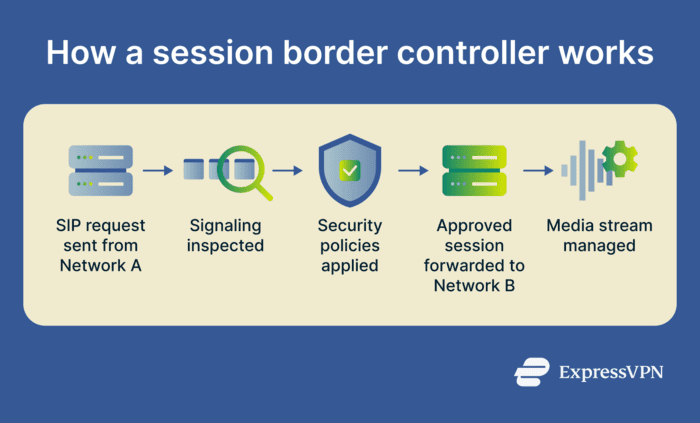
A SBC sits at the border between two networks, managing how sessions are initiated, carried out, and terminated.
In many SIP deployments, it serves as a back-to-back user agent (B2BUA), splitting one call into two separate legs so it can independently monitor and control both ends.
Here’s what the process looks like:
- Session initiation: Intercepts SIP signaling messages and checks them for policy compliance, security risks, and malformed data.
- Session admission control: Evaluates whether to allow the call based on available bandwidth, current session limits, and configured policy controls.
- Media management: Anchors or relays the Real-Time Transport Protocol (RTP) media stream, assists with NAT-T, optionally transcodes codecs, and supports media-quality monitoring.
- Interworking: Translates incompatible signaling or media formats to enable communication between different systems and providers
- Session termination: Processes termination messages, applies logging or billing policies where relevant, and releases network resources.
Types of session border controllers
SBCs are commonly deployed in three main forms:
- Hardware: Physical appliances installed on premises with dedicated processing power. They can deliver consistent performance and strong reliability in environments that require non-shared resources.
- Software: Virtual SBCs that run on existing servers or virtual machines (VMs). They offer flexibility, lower hardware costs, and easier scaling without specialized devices.
- Cloud: Cloud-deployed SBCs reduce on-site hardware management and can support elastic scaling for environments with changing traffic demands.
SBCs can also be categorized by use case:
- Enterprise (E-SBCs): Designed for organizations that need to securely link their internal phone systems to external SIP trunks or hosted Voice over Internet Protocol (VoIP) services.
- Service provider SBCs: Built for telecom carriers, VoIP providers, and large-scale operators that manage high volumes of traffic across multiple networks.
Where are session border controllers used?
Organizations deploy SBCs to:
- Secure SIP trunking: SIP trunks connect internal phone systems to external VoIP providers, making them a common boundary for security and interoperability controls. SBCs sit at this boundary, filtering unwanted traffic, enforcing policies, and controlling what enters and leaves the network. Telecom carriers also deploy SBCs at interconnection points between their core infrastructure, customers, and other carriers.
- Support IP contact centers: Contact centers often handle large volumes of calls across distributed teams and locations. SBCs help secure and manage this traffic, support interoperability, and handle signaling and media control at scale.
- Enable remote and cloud-based work: SBCs help extend secure voice and video communications to mobile workers, remote offices, and cloud platforms where traffic crosses public or external networks.
Why are SBCs important?
SBCc helps to:
- Protect against VoIP attacks: SBCs defend against denial-of-service (DoS) and distributed DoS (DDoS) attacks, including SIP message floods, malformed traffic, and unauthorized registration attempts.
- Prevent toll fraud: Attackers sometimes gain unauthorized access to a VoIP system and place calls to premium-rate or international numbers, leaving the organization on the hook for the bill. SBCs help limit this risk by enforcing access controls, authentication policies, and traffic rules.
- Improve interoperability: SBCs normalize SIP signaling and headers, helping multivendor systems and legacy equipment work together with fewer compatibility issues.
- Support compliance: SBCs can log sessions, support encryption, and apply policy controls to help organizations meet internal audit and regulatory requirements.
- Enhance call quality and control: Poor signaling between private branch exchange (PBX) systems and service providers can cause dropped calls, one-way audio, or failed connections. SBCs help manage signaling and media, support codec mediation where needed, and assist with connectivity across private and public networks.
Risks and privacy concerns
Because SBCs operate at the network edge and process live voice and signaling traffic, they can expose sensitive metadata, including caller and recipient identities, timestamps, and session durations.
In some deployments, they also terminate and re-establish encrypted sessions to support inspection, interoperability, or media services, which means decrypted traffic may briefly exist inside the SBC’s trusted processing path. This makes careful logging, strong key management, and tight access controls especially important.
As high-value edge devices, SBCs can also introduce security risks if they are poorly configured or not kept up to date. Weak administrative credentials, insecure management interfaces, and unpatched firmware can give attackers a path into voice infrastructure or the broader internal network. These risks are reduced through secure configuration, limited management access, regular patching, and careful control of what the SBC logs and processes.
Further reading:
- VoIP VPN: Complete guide to securing your internet calls
- NAT “firewall”: Everything you need to know about network security
- DoS vs. DDoS attacks: Key differences and how to protect yourself
- What is an IP stresser, and how do DDoS booters work?
- What is TLS encryption, and how does it protect your data?